Top 5 Android 17 features that actually matter

Android 17 brings dozens of small tweaks, but these five are the ones worth knowing about.
Android 17 is officially out, and Google released it with a long list of changes ranging from privacy upgrades to small interface tweaks. Most of them are the kind of polish you’ll forget about within a day. A handful, though, actually change how you use your phone day to day. Here are the five worth knowing about.
App bubbles are finally good
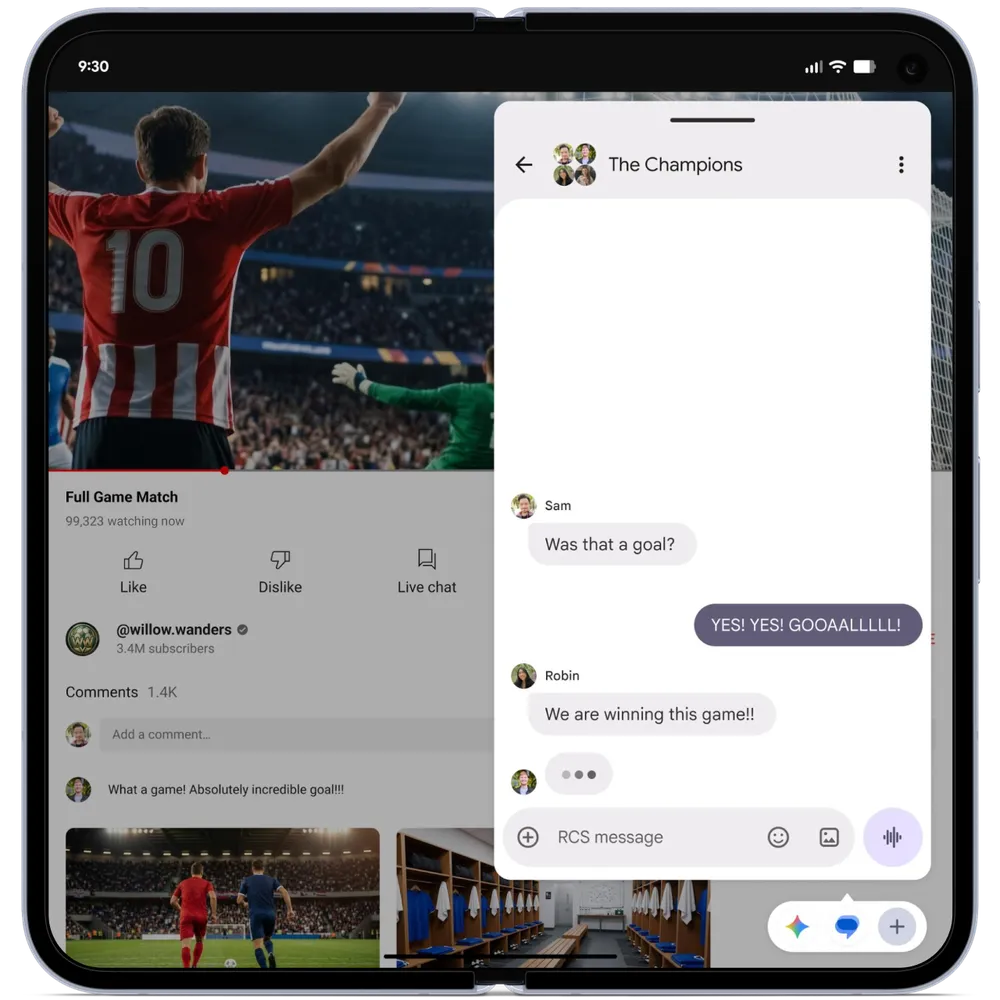
Google has tried this before and pulled back more than once. This time it sticks. Any app on your phone can run in a floating window over whatever else you’re doing, and you can park the icon anywhere on screen. Long-press an app icon, hit the bubble option in the quick menu, and you’ve got a persistent floating window for messaging, notes, or whatever else you want open without losing your place.
The concept itself isn’t new, and Google didn’t invent it. Facebook introduced Chat Heads back in 2013, letting Messenger users keep a conversation floating on screen while doing anything else on their phone.
Google eventually built native support for the idea into Android itself, rolling out the Bubbles API with Android 10 and turning it on by default in Android 11. Android 17 is really just Google finally getting its own version of an idea Facebook had over a decade ago to work the way it always should have.
Screen recording fit for social media

The old recording toggle was barebones. Now you get a floating pill with controls for audio while you’re recording, and once you stop, there’s an actual preview screen where you can trim, share, or just delete the clip without digging through your gallery first.
It’s a small interface change, but it makes the feature feel like an actual tool instead of something bolted on as a checkbox.
But even bigger addition here is Screen Reactions. It lets you record yourself with the selfie camera while simultaneously capturing your screen, essentially giving you a green screen effect without needing a green screen or a separate app. You get your face and your screen activity in the same recording, which is exactly the kind of reaction content people make for social media, just without the extra editing step that used to be required to pull it off.
Quick Reply finally asks before it sends
This one is small but it solves a real annoyance. Suggested replies used to fire off the moment you tapped them. Now they land in a text box first, so you get a chance to glance at what you’re actually sending before it goes out.
It’s a minor tweak, but anyone who’s ever sent the wrong auto-generated reply by accident will appreciate the extra step.
Wi-Fi and mobile data tiles are no longer fused together
If you’ve ever meant to toggle Wi-Fi and killed your mobile data instead, or the other way around, this fixes it. The two now live as separate Quick Settings tiles, each with its own toggle and its own menu.
This is one of those changes that makes you wonder why it took this long. Quick Settings tiles have existed since Android 5.0 back in 2014, and the Wi-Fi and data toggles have shared cramped space in that panel for most of that time. Splitting them isn’t flashy, but it removes a small daily annoyance that’s been part of Android for over a decade.
Parental controls got an actual setup flow
Instead of a buried menu you had to enable manually, there’s now a step-by-step onboarding process for setting up Family Link on a kid’s phone. If you’ve ever had to do this before, you know how much friction this removes.
This brings the setup process into Settings directly instead of requiring a separate app just to get started.
Past these five, everything else in Android 17 falls into the category of nice but forgettable, the kind of polish that makes the OS feel slightly more refined without changing how you actually use your phone. If you’re on a supported Pixel, the update is worth grabbing for these alone.